Guide / Graphs & Links
Architectural Graph & SVG Stencils
Microservice topology design, specialized SVG stencils, and on-canvas node resizing.
The architectural graph view turns a collection of system components into a live blueprint of infrastructure, topology, and inter-service communications.
Specialized SVG Stencils
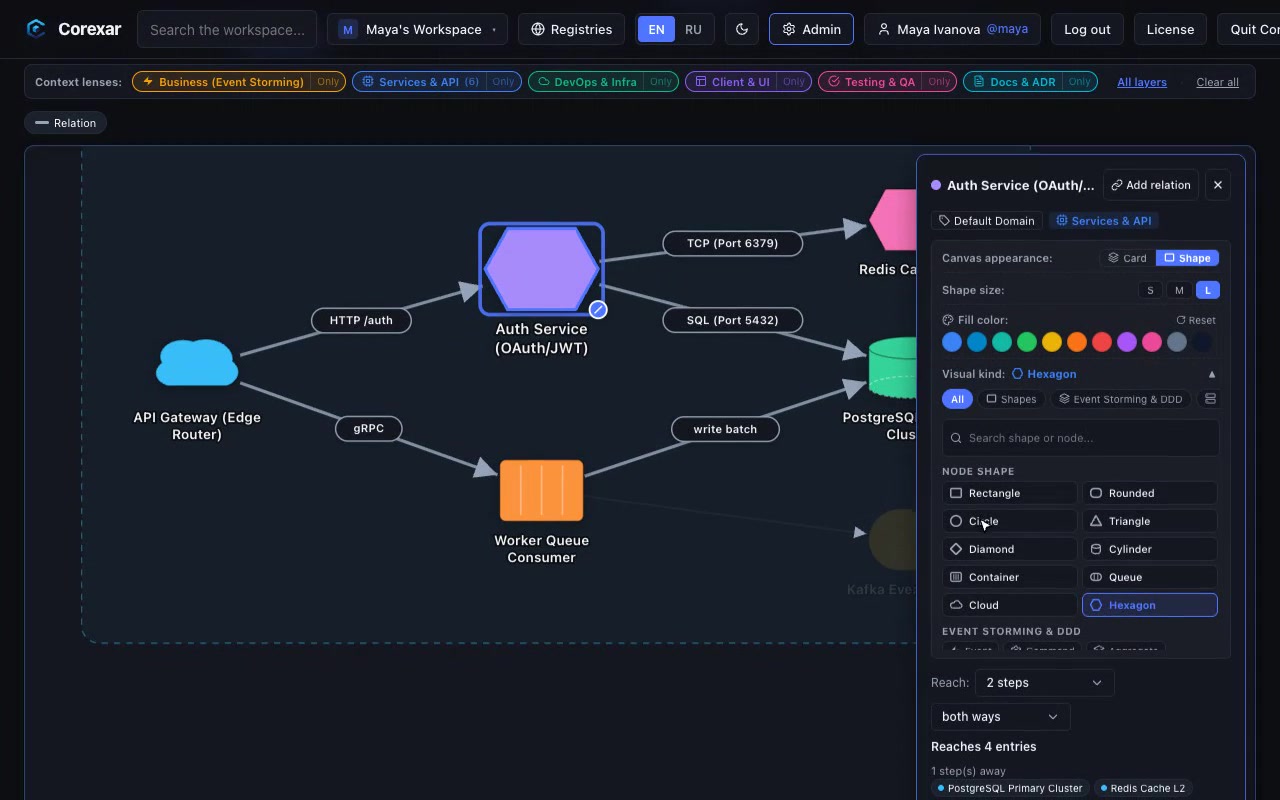
Instead of plain rectangular cards, nodes can display standard architectural vector silhouettes reflecting their operational role.
 Hover to play
Node Display Modes: Card and Shape
Each node on the canvas can be toggled independently between display modes via the node details panel:
| Mode | Appearance | Best Suited For |
|---|---|---|
| Card | Rectangular card with status, icon, and custom fields | User stories, tasks, project specs, metadata-heavy entries |
| Shape | Geometric vector stencil with accent color and icon badge | Microservices, database clusters, message queues, API gateways |
Architectural Stencil Catalog
The stencil catalog provides foundational building blocks of modern systems engineering:
- Cloud — for public gateways, CDNs, external SaaS, and third-party APIs.
- Cylinder — for database clusters (PostgreSQL, ClickHouse), data warehouses, and S3 storage.
- Queue — for message brokers, event streams, and worker queues (Kafka, RabbitMQ).
- Hexagon — for distributed caches (Redis, Memcached) and standalone services.
- Container — for background daemon workers, Kubernetes pods, and isolated microservices.
Tip. Nodes can be resized in two ways: choosing S, M, L presets in the properties panel or dragging the bottom-right corner resize handle directly on the canvas.